Design
What a Custom Cornhole Board Designer Will Let You Preview
Cole Brennan, Contributor
9 min read
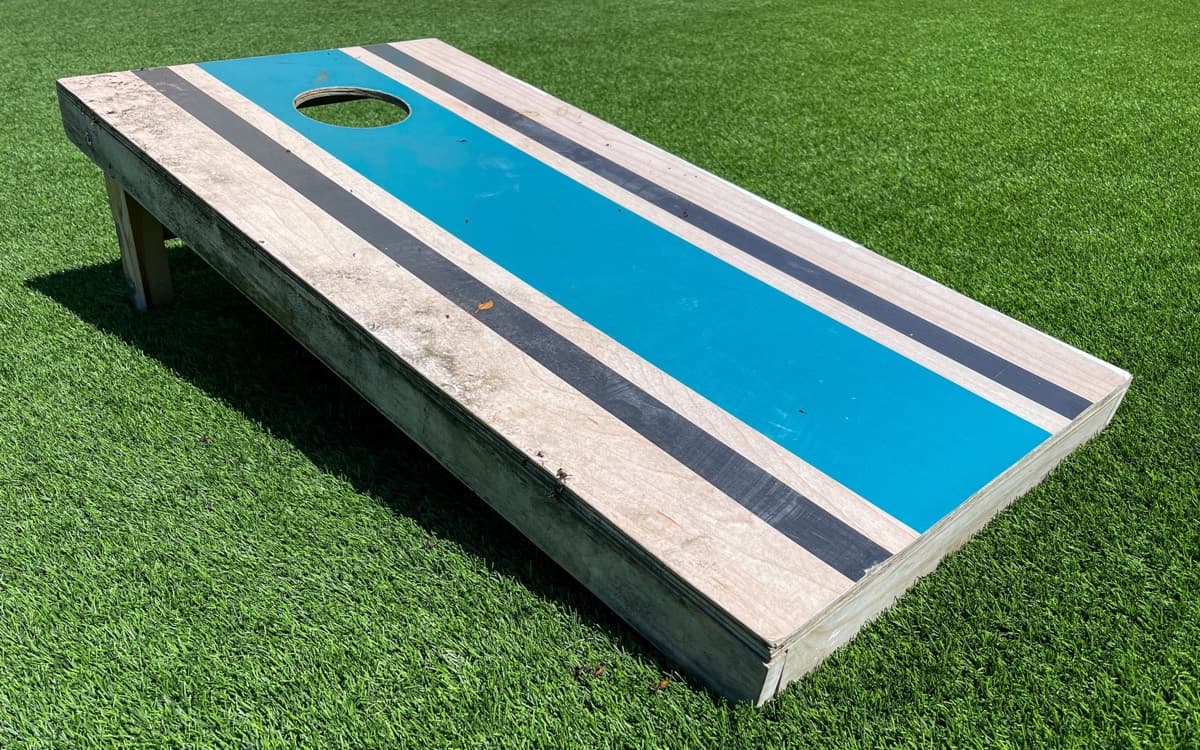
Most vendor sites bury their configurators three clicks deep. You pick a SKU thumbnail, upload a logo, and hope the proof email matches what you pictured. A purpose-built custom cornhole board designer should show your build updating on screen as you change the face, finish, and art, so you are not guessing from a flat product photo.
The short answer: An online cornhole board designer is a browser tool that will let you preview finish sheen, frame color, and artwork on a regulation 24in x 48in face before anything is cut. At launch the face will be birch or all-weather, not a menu of wood stains. You will get a full preview of the board, zoom the print, and share a link with a partner or marketing lead. You will not spin the board in 3D. The Cornhole Exchange Design Studio is not live yet, but when it opens it will update the preview on every edit instead of making you wait on mockup emails.
| Preview control | What you will see on screen | Why it matters |
|---|---|---|
| Playing surface | Birch or all-weather | Two faces at launch, not honey oak, walnut, or espresso |
| Accent / frame color | Team, school, or brand-matched edge | Frames show wear first at cookouts |
| Finish sheen | Matte, satin, gloss | Changes slide speed and glare at dusk |
| Artwork | Logo, photo, lettering, or library layout | Placement around the 6in hole affects aim |
| View controls | Full preview and zoom (no 3D spin) | Catches edge clipping before a build starts |
| Share | Link for partner, league, or marketing lead | Replaces screenshot mockup threads |
Why a custom cornhole board designer beats email mockups
The usual path still looks like this: you email a logo, wait on a flat proof, reply with tweaks, and repeat. A related Google search for "design your own cornhole boards" surfaced an AI overview in August 2026 noting that most retailers send a digital proof before printing. Helpful, but each revision still costs hours or days.
A browser preview renders every color, finish, and decal as you pick it. Upload a PNG, SVG, or PDF and the print team will run a free file check before anything is cut. Layouts start from tournament spec on the regulation build, so a backyard board still meets American Cornhole League requirements for sanctioned play. You will also save and share a link before committing to a build.
| Email mockup | Browser designer preview | |
|---|---|---|
| Turnaround | Hours to days per revision | Instant on each edit |
| Regulation hole placement | Often manual in Photoshop | Baked into template |
| Finish sheen | Rarely shown | Matte, satin, or gloss visible |
| Stakeholder review | Forwarded PDFs | Shareable link |
| File format feedback | Sometimes extra fee | Free print check |
The preview should reflect UV-cured direct print, not a vinyl wrap thumbnail.
The four steps you will walk through
The coming workflow is outlined on the How It Works section of the homepage. Think of it as a cornhole board configurator you walk through once, not a chain of proof emails.
- Pick your board. Start with a regulation tournament board, then choose a birch or all-weather face, edge profile, and finish. The tournament board is built to ACL published specifications.
- Make it yours. Drop in your own logo, photo, or artwork, or build a design from a library of colors, stripes, and team layouts.
- See it before you buy it. Check the full preview, zoom in on the print, and confirm the finish on screen. What you see in the browser is what gets built.
- We build and ship it. Once ordering opens, your design goes straight to the shop floor. Boards are finished by hand and on your doorstep in about two weeks.
What you will be able to change in the preview
Each option below is something the preview will reflect as you edit, not a line item you have to imagine from a product thumbnail.
| Option | Preview detail | Where to learn more |
|---|---|---|
| Playing surface | Birch or all-weather | Materials |
| Accent color | Frame and edge colors matched to team, school, or brand colors | Design ideas |
| Finish | Matte for the slowest slide, satin for the tournament standard, gloss for the fastest slide | Materials |
| Artwork | Your logo, a photograph, lettering, or a layout from the design library, printed edge to edge | Design ideas |
Regulation defaults apply to the tournament build: a true 24in x 48in face with a 6in hole centered 9in from the top edge, on a 2x4 frame that sets the front edge at 12in. Those measurements come from ACL published specifications, not from a template someone guessed at in Photoshop. See the full breakdown in our regulation dimensions guide.
File formats and what the preview will flag
The designer will accept PNG, SVG, and PDF files. Vector artwork gives the sharpest result. A member of the print team reviews every uploaded file for free and flags anything that needs adjusting before production.
That review pairs with what you see on screen. Zoom in on the print area and you will catch problems a flat mockup email might hide.
| Mistake | What goes wrong in preview | Fix |
|---|---|---|
| Low-res raster logo | Pixelation visible when zoomed | Upload vector SVG or PDF |
| Art centered on hole | Text disappears mid-game | Keep copy below the cup zone |
| RGB neon on the wrong face | Colors wash out on birch or go muddy on all-weather | Preview on the birch or all-weather face you will actually build |
| Unlicensed sports marks | Legal risk for breweries and events | Use team-color blocks instead |
| Square social crop | Logo clipped at edges | Design to the full 24in x 48in face |
How vendor configurators compare today
A live SERP check in August 2026 surfaced mostly storefronts and configurators embedded in product pages, with shopping carousel prices running from about $149.95 to $545 depending on the listing. Custom Cornhole, LLC advertised unlimited design mockups on regulation-size boards, with carousel snippets showing a $45 to $310 band on the same SERP.
Here is what the top organic players offer today, without implying any one path is right for every buyer:
- American Cornhole Association (playcornhole.org) runs an in-page customization tool plus a download-design-upload template workflow for users who design outside the app.
- Skip's Garage uses an Aircada-powered configurator with full-surface graphic uploads, real-time 3D preview, and manufacturing-ready file generation, per the vendor's public case study on aircada.com.
- Custom Corntoss markets an interactive board designer for picking colors, uploading logos, and swapping patterns.
These tools exist inside checkout flows. None publish a regulation-first preview guide for shoppers still comparing paths. The Cornhole Exchange documents its coming designer on The Designer section of the homepage.
Backyard and gift use cases
Most people searching for an online cornhole board designer want something personal: a wedding date, a family photo, tailgate colors, or a housewarming name across the face. The preview lets you test script placement around the 6in hole before a bag hits the board. For layout inspiration, start with cornhole board design ideas.
When you need someone else to sign off
Marketing directors, league commissioners, and event planners need five people to agree without a dozen email threads. A shareable preview link replaces forwarded PDFs. Volume pricing will start at 10 sets and include Pantone color matching, a brand guideline review, and blind drop shipping to multiple addresses. Bulk ordering opens alongside the designer. See the corporate cornhole sets guide.
What is not live yet
The Cornhole Exchange in-browser Design Studio is in development. This article documents what it will let you preview, not what you can do today. Check the FAQ for availability and file formats. Watch The Designer section for launch updates.
What to do after reading this
Still weighing build paths? Read DIY vs custom cornhole boards compared for the time and quality tradeoffs. Once ordering opens, the preview feeds directly into the custom cornhole set buying guide checklist. Need inspiration before you touch a single control? Browse cornhole board design ideas first.